Introduction
Lesson planning is one of the most important parts of effective teaching.
Before entering the classroom, teachers often need to decide what students should learn, which resources should be used, what activities will support the topic, how much practice is required, and how understanding will be assessed.
This process can become time-consuming when teachers have to search for resources, organize content, prepare activities, create questions, and plan assessments separately.
Digital learning platforms can help make this process more organized.
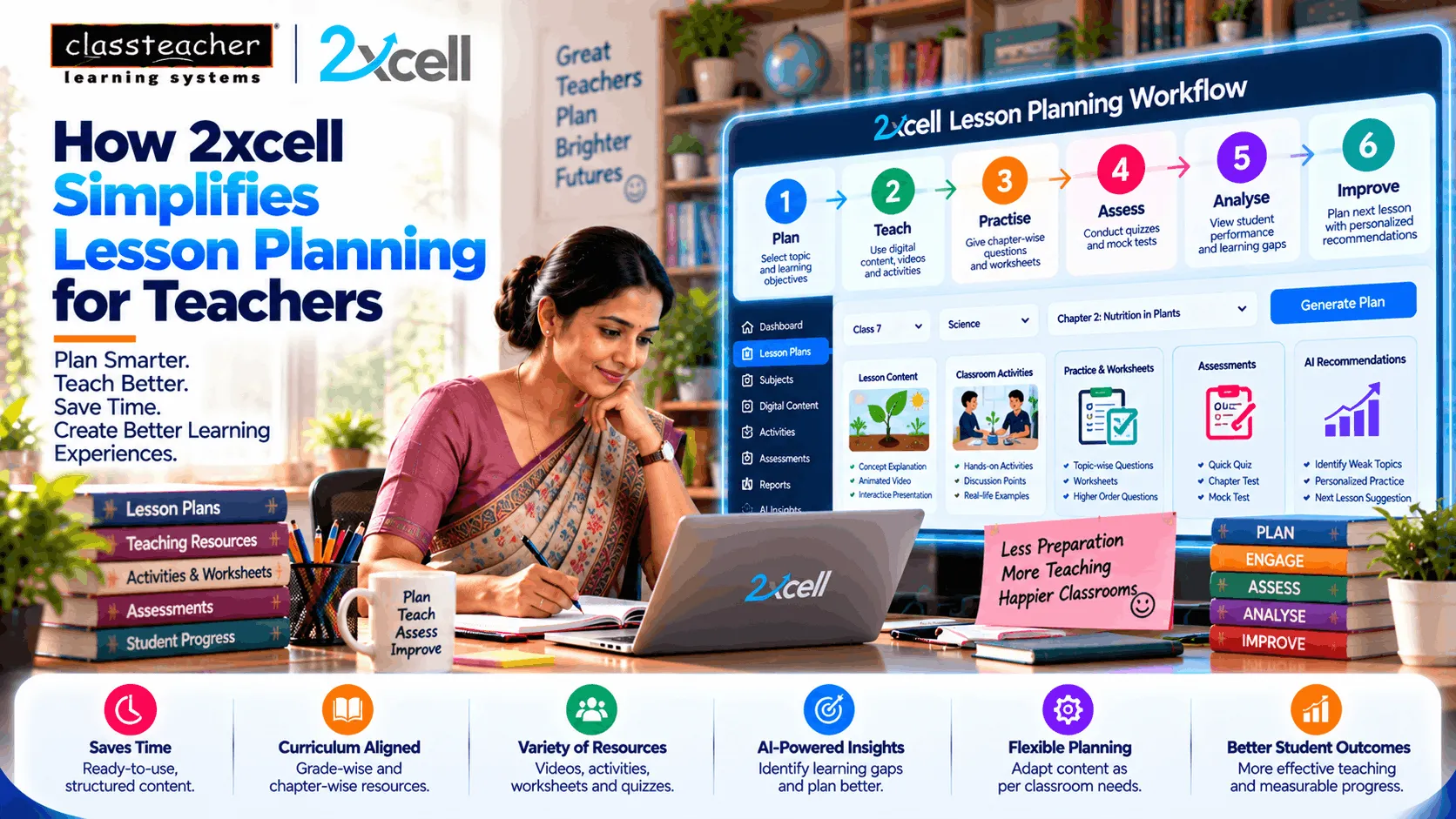
2xcell AI Learning Platform by CLASSTEACHER Learning Systems brings learning content, practice, assessment, analytics, and personalized learning into a connected digital environment.
Instead of treating every lesson resource as a separate task, teachers can work through a more structured teaching journey:
Plan → Teach → Practise → Assess → Analyse → Improve
The objective is not to replace teacher planning.
It is to make planning more efficient and give teachers more time to focus on students.
What Makes Lesson Planning Time-Consuming?
A lesson plan may involve several activities before the actual teaching begins.
Teachers may need to:
- Identify the learning objective
- Review the curriculum
- Select teaching material
- Prepare examples
- Find visual resources
- Create activities
- Prepare practice questions
- Plan assessments
- Decide how to support struggling students
- Prepare revision material
When these resources are stored separately, planning can become repetitive.
A connected digital platform can help bring relevant resources into a more organized workflow.
1. Start With a Clear Learning Objective
Effective lesson planning begins with knowing what students should understand by the end of the lesson.
For example:
Topic: Fractions
Learning Objective: Students should be able to compare and solve basic fractions.
Once the objective is defined, the teacher can connect:
Explanation → Example → Practice → Assessment
This keeps the lesson focused instead of adding unrelated digital resources.
2. Organized Content Can Reduce Resource Searching
Teachers often spend time searching for suitable content before a lesson.
They may look for:
- Videos
- Presentations
- Diagrams
- Examples
- Activities
- Worksheets
- Practice questions
When relevant resources are organized according to subjects, chapters, and topics, teachers can locate material more easily.
This can reduce the amount of time spent searching for resources and allow teachers to concentrate more on how the content should be taught.
3. Curriculum-Aligned Content Supports Better Planning
Digital content is most useful when it connects with the curriculum being taught.
A structured learning platform can organize content around:
- Grade
- Subject
- Chapter
- Topic
- Learning objective
- Practice
- Assessment
For example, a teacher preparing a Grade 8 science lesson can move directly to the relevant topic instead of searching through unrelated digital material.
This can make lesson preparation more systematic.
4. Teachers Can Combine Different Types of Learning Resources
A single explanation may not work equally well for every topic.
Teachers may need a combination of:
Text + Images + Video + Animation + Examples + Activities
For example, a lesson about the water cycle can begin with a visual animation, followed by a teacher explanation and then a short practice activity.
A digital platform can help teachers bring these different learning formats into the same teaching journey.
5. Lesson Planning Can Become More Structured
Instead of creating every lesson from the beginning, teachers can follow a structured sequence.
Before the Lesson
Define the objective and select relevant resources.
During the Lesson
Explain the concept and use digital content where useful.
Practice
Give students an opportunity to apply the concept.
Assessment
Check whether students understood the topic.
Review
Identify areas that require additional explanation.
This creates a practical planning framework without taking away teacher flexibility.
6. Practice Can Be Connected Directly to the Lesson
Lesson planning should not stop after explaining a concept.
Students need opportunities to apply what they have learned.
A connected digital learning environment can support:
Learn → Practise → Check
For example, after a mathematics lesson, students can complete topic-specific questions.
The teacher can then review the results and decide whether the class is ready to move forward.
7. Assessments Can Become Part of the Lesson Plan
Assessment is often planned separately from teaching.
However, formative assessment can be integrated into the lesson itself.
A teacher can plan:
Concept Explanation → Classroom Activity → Quick Quiz → Result Review
This allows the teacher to check understanding before moving to the next topic.
If students perform well, the lesson can progress.
If many students struggle, the teacher can revisit the concept.
8. Performance Insights Can Help Teachers Plan the Next Lesson
Lesson planning does not end when the class finishes.
The results of one lesson can influence the next lesson.
For example:
Lesson 1: Introduction to Algebra
Assessment: Students struggle with equations
Next Lesson: Additional explanation + guided practice
Follow-up: Short reassessment
This creates a continuous planning cycle.
Teach → Measure → Understand → Adjust → Teach Again
Analytics can support this process by organizing performance information for teachers.
9. 2xcell Can Support Personalized Lesson Planning
Students in the same classroom can have different learning requirements.
One student may need foundational practice.
Another may already understand the concept.
A third may need a more challenging application activity.
A digital learning environment can help teachers access different types of resources based on student performance.
For example:
Students Requiring Support
Additional explanation + basic practice
Students at Expected Level
Regular practice + assessment
Advanced Students
Application questions + extension activities
This can help teachers plan differentiated learning experiences.
10. Digital Resources Can Make Revision Planning Easier
Teachers frequently need to revisit previously taught concepts.
Instead of preparing revision material from scratch, organized digital content can provide access to relevant resources.
A revision plan may include:
Concept Review → Short Explanation → Practice → Quiz
This can make revision more targeted.
Teachers can select resources according to the topic students need to revisit.
11. Teachers Can Reuse and Adapt Lesson Resources
A useful lesson resource does not have to be created repeatedly.
Once a teacher has prepared a lesson pathway, relevant digital resources can potentially be reused for:
- Another section
- Revision classes
- Remedial teaching
- Homework
- Examination preparation
- Additional practice
Teachers can also adapt the same content according to the needs of different classes.
This can reduce repetitive preparation work.
12. Lesson Planning Can Include Different Teaching Formats
Modern classrooms can combine multiple teaching approaches.
A lesson could include:
Direct Teaching
Teacher explains the concept.
Visual Learning
Students observe diagrams, videos, or animations.
Interactive Activity
Students participate in an activity or discussion.
Digital Practice
Students complete topic-specific questions.
Assessment
Teacher checks understanding.
This gives teachers greater flexibility in designing classroom experiences.
13. AI Can Support Teachers With Learning Insights
AI can process large amounts of learning information and highlight patterns.
For example, a teacher may discover that:
- Students are performing well in basic questions
- Application questions are causing difficulty
- A particular concept has repeated errors
- Some students need additional practice
These insights can help teachers decide what should happen next.
The important model is:
AI Identifies Patterns → Teacher Interprets Them → Teacher Plans the Response
AI supports the planning process, while the teacher remains responsible for academic decisions.
14. Teachers Can Plan Remedial Activities More Easily
When students struggle with a topic, teachers may need to create additional learning activities.
Digital content can support remedial planning through:
- Alternative explanations
- Additional examples
- Practice questions
- Revision videos
- Topic-based activities
- Follow-up assessments
This can help teachers respond to specific learning requirements instead of repeating the entire lesson.
15. Technology Can Help Plan Extension Activities
Lesson planning should also consider students who are ready to go beyond the basic concept.
For advanced learners, teachers can introduce:
- Application-based problems
- Research activities
- Projects
- Higher-order questions
- Real-world case studies
- Advanced practice
This allows the same lesson to support students at different levels.
16. Lesson Planning Can Become Data-Informed
Traditional lesson planning often relies heavily on teacher experience and classroom observation.
These remain extremely important.
Digital learning platforms can add another information source: student performance data.
For example:
Previous Performance → Current Assessment → Learning Gap → Next Lesson Plan
This can help teachers make planning decisions using both professional judgement and available learning evidence.
17. Teachers Spend Less Time Managing Separate Resources
A common challenge with digital teaching is having resources spread across multiple locations.
A teacher might use one tool for videos, another for quizzes, another for assignments, and another for results.
A connected learning environment can reduce this fragmentation by bringing multiple learning activities together.
The workflow can become:
Content → Practice → Assessment → Analytics
This can make the teaching process easier to manage.
18. 2xcell Supports a Connected Teaching Workflow
2xcell AI Learning Platform by CLASSTEACHER Learning Systems can support a connected digital learning environment where teachers can work with learning content, practice, assessments, analytics, and personalized learning.
A simplified workflow can be:
Step 1 — Learn
Introduce the concept through structured learning content.
Step 2 — Practise
Provide relevant activities and questions.
Step 3 — Assess
Check student understanding.
Step 4 — Analyse
Review performance information.
Step 5 — Personalize
Identify which students or topics require additional support.
Step 6 — Improve
Plan the next learning activity based on the available insights.
This turns lesson planning into a continuous process rather than a one-time activity.
19. Teachers Remain at the Centre
Technology can support planning, but it cannot replace the teacher's understanding of the classroom.
Teachers know:
- Student learning behaviour
- Classroom dynamics
- Individual requirements
- Common misconceptions
- Learning pace
- Student interests
- Appropriate teaching strategies
A performance report may show that students are struggling with a concept.
The teacher decides whether the solution should be:
- Another explanation
- A practical example
- Group work
- Individual support
- Additional practice
- A different teaching method
Therefore:
Technology Provides Information → Teacher Provides Context → Better Planning
20. How a Technology-Supported Lesson Plan Can Look
Consider a lesson on Photosynthesis.
Learning Objective
Students understand how plants produce food.
Digital Explanation
Use an animation showing the process.
Teacher Interaction
Explain the role of sunlight, carbon dioxide, water, and chlorophyll.
Practice
Students answer concept-based questions.
Assessment
Conduct a short digital quiz.
Analysis
Review common mistakes.
Follow-Up
Provide additional explanation or practice where required.
This creates a complete learning cycle without making technology the centre of the lesson.
How 2xcell Can Help Make Lesson Planning More Efficient
The broader role of 2xcell AI Learning Platform is to connect different stages of learning rather than treating them as independent activities.
The platform can support an ecosystem involving:
- Digital learning content
- Practice
- Assessment
- Analytics
- Personalized learning
For teachers, this can provide a more organized foundation for planning classroom activities.
For students, it can create a connected learning journey.
For schools, it can support a more data-informed approach to teaching and learning.
The objective is simple:
Less Time Searching. More Time Teaching.
What Schools Should Consider When Using Digital Platforms for Lesson Planning
Schools should evaluate technology based on its usefulness for teachers and students.
Important considerations include:
Curriculum Alignment
Does the content support the school's curriculum?
Ease of Use
Can teachers access resources quickly?
Content Quality
Are learning resources accurate and appropriate?
Practice and Assessment
Can lessons connect naturally with practice and assessment?
Analytics
Can teachers understand student performance?
Personalization
Can students receive different learning support where required?
Teacher Control
Can educators adapt the resources according to classroom requirements?
Scalability
Can the platform support the school's future digital learning needs?
Avoiding Overdependence on Technology
Technology should make lesson planning simpler, not more complicated.
Teachers should not have to spend more time managing digital tools than they previously spent preparing lessons.
The ideal approach is:
Simple + Organized + Relevant + Actionable
Digital resources should support the lesson objective.
If a technology feature does not contribute to learning, it may not need to be included.
The Future of Lesson Planning
As AI and digital learning continue to develop, lesson planning may become increasingly connected with student performance.
A future workflow could look like:
Curriculum Goal
↓
Digital Lesson Resources
↓
Classroom Teaching
↓
Practice
↓
Assessment
↓
AI-Assisted Insights
↓
Teacher Review
↓
Next Lesson Plan
This creates a feedback loop where one lesson informs the next.
Teachers can continue using their professional expertise while gaining additional information from digital learning systems.
Conclusion
Lesson planning is an essential part of teaching, but it can become time-consuming when teachers have to manage learning content, activities, practice, assessments, and performance information separately.
A structured digital learning environment can help bring these elements together.
2xcell AI Learning Platform by CLASSTEACHER Learning Systems supports a connected approach involving digital content, practice, assessment, analytics, and personalized learning.
The aim is not to automate the teacher.
It is to reduce repetitive work, organize learning resources, provide useful insights, and give teachers more time to focus on what matters most — teaching students.
The future of lesson planning can therefore be:
Plan Smarter → Teach Better → Understand Learning → Adapt Faster
2xcell AI Learning Platform
By CLASSTEACHER Learning Systems
Empowering Education with AI & Innovation.